




iFood360°

Virtual Reality Training for People in the
Candian Food and Beverage Manufacturing industry

Welcome Employees!

iFood360 work mark white
Virtual Reality Training for People in the Canadian Food and Beverage Manufacturing industry

Watch the Onboarding Video

Welcome To Your Training Portal!

We wish you success as you continue on your learning journey. You will discover that growing your skills is essential not only in your career but in all your relationships with others. When people succeed in improving their knowledge, they enhance their contributions to their organization and to their families and communities as well. We are confident that this program will serve as a memorable milestone in your career development.
Follow the steps below to get started with iFood360°!

Steps to Participating in iFood360°

Click each of the numbered circles for more information and to access the links.
Watch the Onboarding Video

The video will take you through what to expect.

Sign Up
Sign Up
Click the button below to complete your registration form.
Review Your iFood360° Package
Review your iFood360° Package

There is lots of important and helpful information.

Log In
Log
In

Click below to log in to begin your online learning journey.

Go Virtual
Go Virtual

Connect with your onsite contact to access the Quest 2 Headset and learn in virtual reality.

Onboarding Video

“Thank you for partnering with Food Processing Skills Canada in this exciting and innovative learning program. We’ve gone to great lengths to ensure that your learning journey delivers valuable industry related and social emotional content that is enjoyable and easy to access. This video will walk you through the details of the program and get you off to a great start.”

Jennefer Griffith

Executive Director, FPSC

Sign Up

If you are here for the first time, we need you to complete a registration form.

The form is designed to collect information that will help us understand who is enrolled in the program, what types of assistance might be of most benefit for you, and to highlight specific skills and areas of potential interest.

Please answer all the questions. If you don’t understand a question or are not sure what to write, please let your coordinator know and they will be happy to help you.

The information you provide on this form will be used for iFood360° program purposes only.

To complete the form, click the Sign Up button below.

Your iFood360° Package

You should have received a package with important and helpful information about the iFood360° program. Please take a moment to review the contents. It is all designed to make your participation in the project as productive and enjoyable as possible.
It includes:

  • A Welcome Letter
  • A Curriculum Workbook – to support your online learning
  • A VR Users Guide – to help you get started in VR
  • A Reference Card, with information on accessing our resources
  • And some extra goodies

Log in to the Learning Management System (LMS)

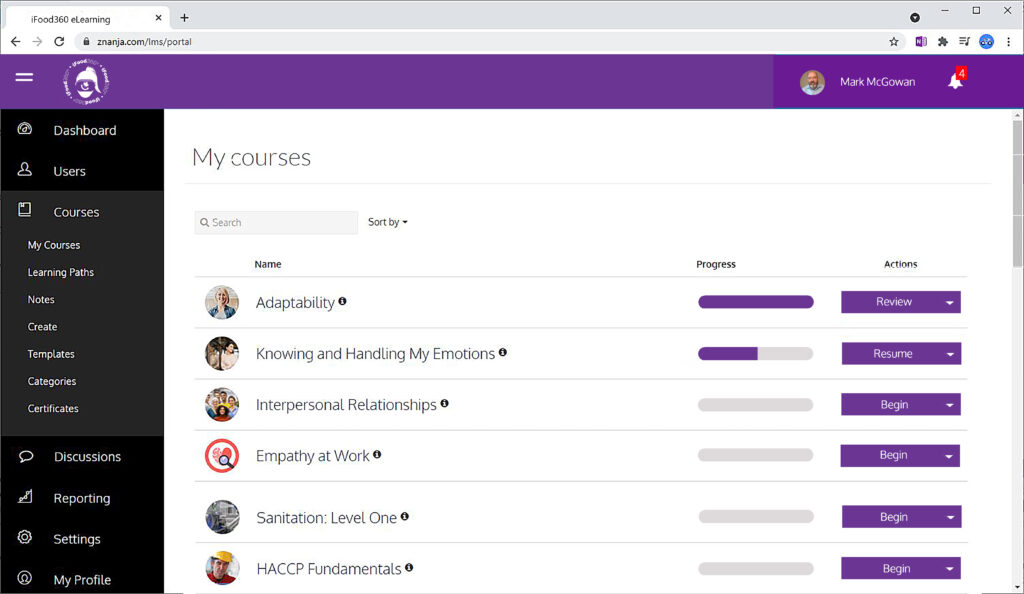
Your online learning journey will take place on our LMS.

Once you have completed your registration there will be a short delay before you can access the LMS. Once your registration has been completed, you will receive an email with your user name and a link to access the LMS. Use the link in the email or click the ‘Log In’ button below. Enter your username and the password that was provided in your welcome kit.

To learn more about the LMS, watch the onboarding video above, if you haven’t already.

Begin Your Journey in Virtual Reality

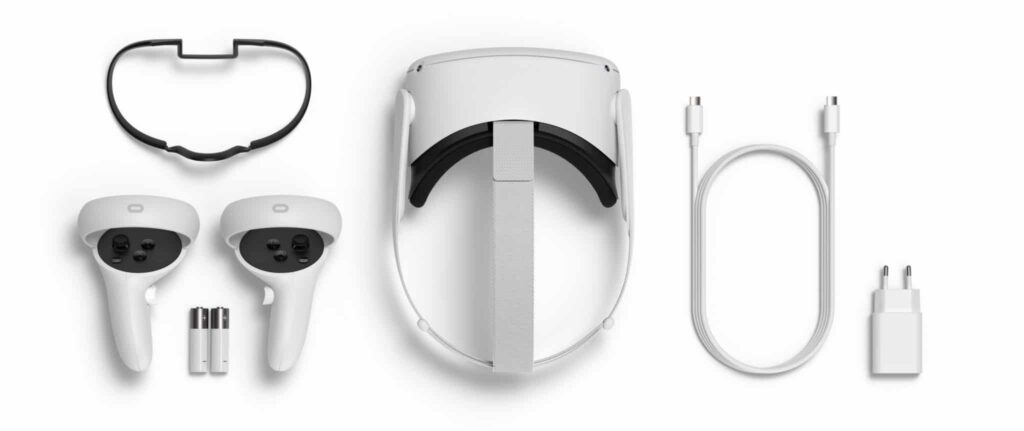
Once you’ve completed your online learning, connect with your onsite contact to arrange access to the Meta Quest 2 VR Headset and get ready to enjoy the iFood360 virtual reality experience.

Make sure you read the VR User Guide included in your package. It includes important information about the safe use of your device and will help you get off to a great start.

Support

If you’re having trouble during your learning journey there are several resources to support you. 

Onsite Contact

Your company’s onsite contact manages the iFood360° program for your company. They may already know the solution for the problem you are having.

Knowledge Base

Search our knowledge base for common questions and solutions.

Contact iFood360°

Still having trouble? We can help. You can submit a support request through our website, or email us at info@ifood360.ca.

LMS Video

New to the Learning Management System? Click the button below to watch a video on how to use it.

LMS Help

Are you having a problem with the Learning Management System? Click the button below to submit a support request. You can also call 1-800-730-7115 and select option 3.

Getting Set Up with the Quest 2 Headset

The Meta Quest 2 headset can take some time to get familiar with. Here are some helpful instructions and videos on how to get set up for success. This is not a substitution for reading the safety instructions that came with the headset, or the Meta Quest 2 User Guide that was provided with your program package. Be sure to thoroughly review those documents before using your headset.

1. Adjusting Your Straps and Lenses

The first step of getting set up is to adjust the straps and lenses to ensure your headset is comfortable and that the picture is clear.
First, make sure the headset is turned on. If the headset is already on, the indicator light (on the right side of the headset) will be white. 
If there is no light, push the power button, to the left of the indicator light. It will take a moment for the headset to start.
Now watch the video and follow the instructions.
Tip: You can hold the headset up to your face with your hand to check the adjustment of the lenses before adjusting your straps

2. Grasp the Controllers

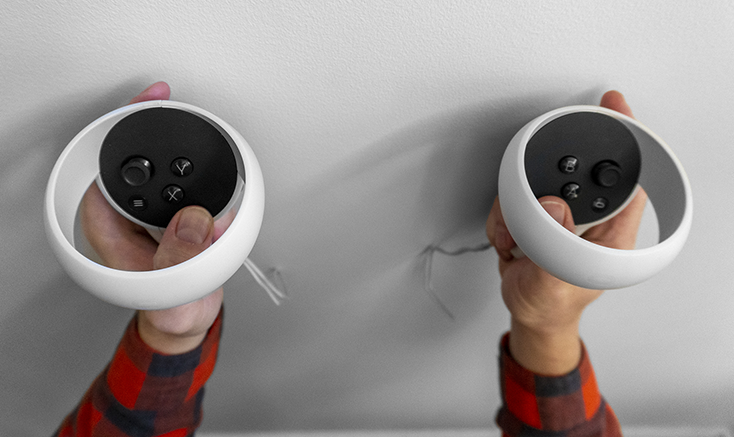
The controllers for the Quest 2 can be confusing at first. A simple way to determine the left from the right controller is that the left controller has a ‘Y’ and ‘X’ button, and the right controller has an ‘A’ and ‘B’ button. 
The image on the right demonstrates how to grasp the controllers correctly. Be sure to slide the safety straps over each wrist and tighten them first, for your safety, and the safety of others. 
The image below demonstrates how to grasp the controllers correctly. Be sure to slide the safety straps over each wrist and tighten them first, for your safety, and the safety of others. 
Controller grip
For each controller, the grip switch should be facing your other hand, or inwards. Your index, or pointer finger, should rest on the trigger switch, at the front of the controller. Your middle finger should rest on the grip switch, and your thumbs should hover over the buttons within the dark grey circle. Your ring finger and little finger grasp the controller.
Controller grip

3. Setting the Guardian

When you are using a VR headset, you will not be aware of the environment around you. That’s why it is important to set a ‘Guardian’ boundry to ensure you are safe during your experience.
Watch the video on the right to set up a safe stationary boundry for yourself when you are in VR.
You should remain stationary when engaging in the upcoming VR experiences. You can be seated or standing. If you are seated, we recommend that you use a swivel chair to allow you to fully explore the environment.

Get Familiar with VR

Now that your headset is fitted and you are gripping the controllers correctly, we’d like you to explore the Oculus ‘First Steps’ program. This program is a great introduction to the virtual reality environment, and will help you get familiar with the controllers and the experience.
Watch the video to the right on how to launch ‘First Steps,’ then use the headset and controllers to launch the program.
Tip: A small percentage of people can feel uncomfortable when using VR. If you experience nausea, dizziness, or general discomfort, feel free to stop at any time. Please still complete the the post experience survey so we can understand the extent of the issue 

Explore iFood360°

Now that you are comfortable in VR, it’s time to explore iFood360°.
Watch the video to the right on how to launch ‘iFood360°,’ then use the headset and controllers to launch the program.

Curriculum

The iFood360° curriculum is broken into 2 streams, operational skills and social emotional skills, and includes industry validated online learning and newly developed virtual immersive experiences to enhance and reinforce the e-learning content. FPSCs library of e-learning courses is developed with subject matter experts – by industry, for industry.  

Use the arrows and thumbnails below to explore your iFood360° project curriculum streams.

Operational Skills

The operational skills curriculum focuses on food and worker safety, and will deliver detailed instruction on important theory and  processes to enhance your industry knowledge and skills.
Industrial

Industry Specific Skills
Workplace and Industrial Safety

1 hr. E-learning Course

This course covers safety measures that are required to ensure a healthy and safe work environment. Students will learn how to identify potential hazards and how to respond to them.

Virtual Immersive Experience

Get ready to work safely. Select and put on your PPE in virtual reality.

previous arrowprevious arrow
next arrownext arrow
Industrial
GMPs
Lock Out Tag Out
Sanitation Level 1
Allergens Level 1
Distribution and Warehouse Food Safety
Food Spoilage and Food Safety
previous arrow
next arrow

Social Emotional Skills

The social emotional curriculum focuses on the five elements of emotional intelligence, and delivers training on understanding and managing the social and emotional aspects of you life. The courses cover important and impactful learning, including knowing and handling your emotions, and developing your adaptability, empathy, and resilience.
Intro to EI

Social Emotional Skills
Introduction to Emotional Intelligence

2 hr. E-learning Course

Understand yourself better, to help you deal with everyday problems and conflicts more effectively, making better decisions, building and maintaining healthy relationships with others’, and being more productive at work. 

Virtual Immersive Experience

Visit the virtual Champion’s League village and refresh your Emotional Intelligence knowledge.

previous arrowprevious arrow
next arrownext arrow
Intro to EI
Knowing and Handling My Emotions
Adaptability in the Workplace
Empathy at Work
Building Personal Resilience
previous arrow
next arrow